Settings
All of φ Poiesis's settings are in one window. The sections are listed on the left. Click a section to see its settings on the right. A change works at once; you don't need to save it.
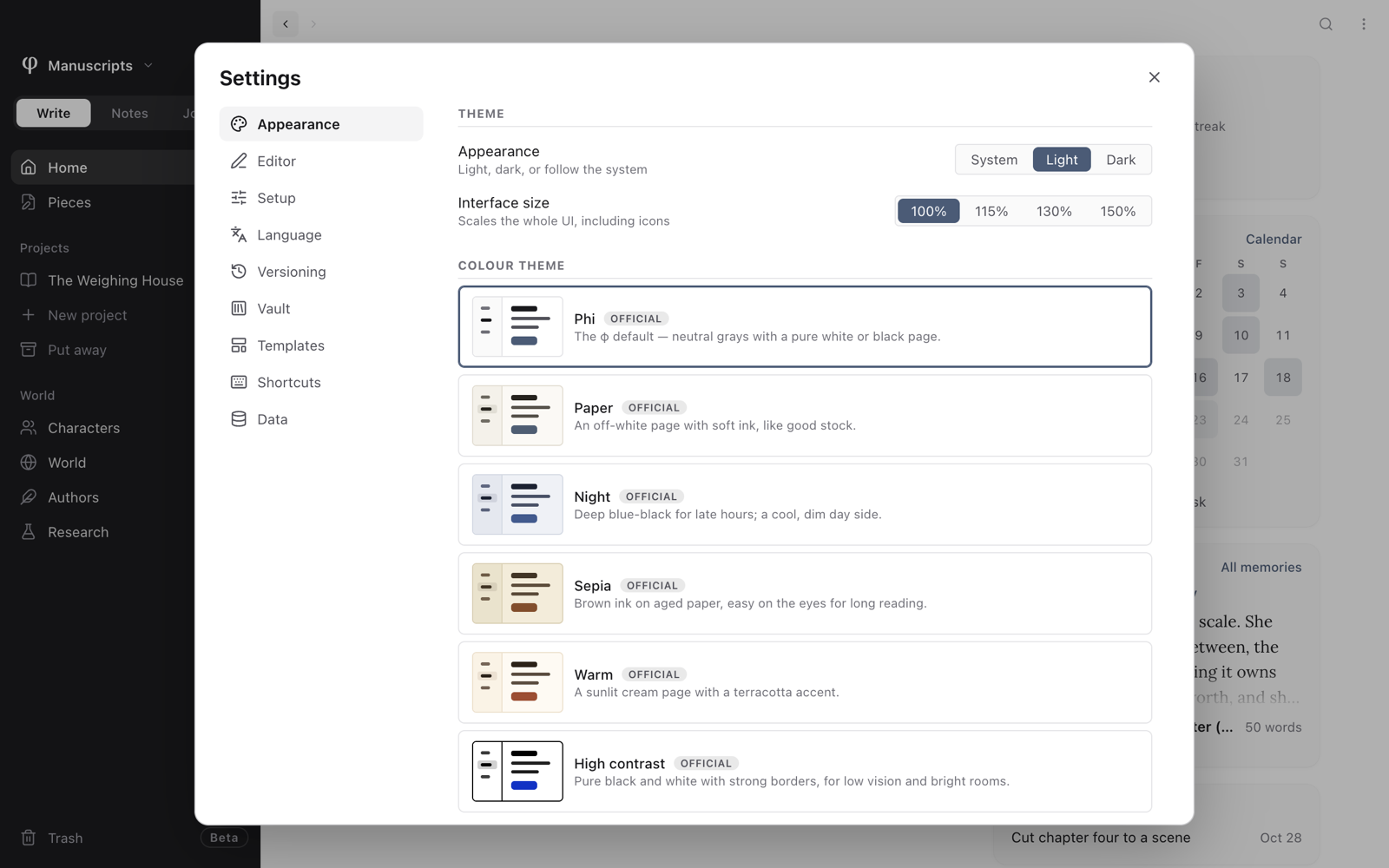
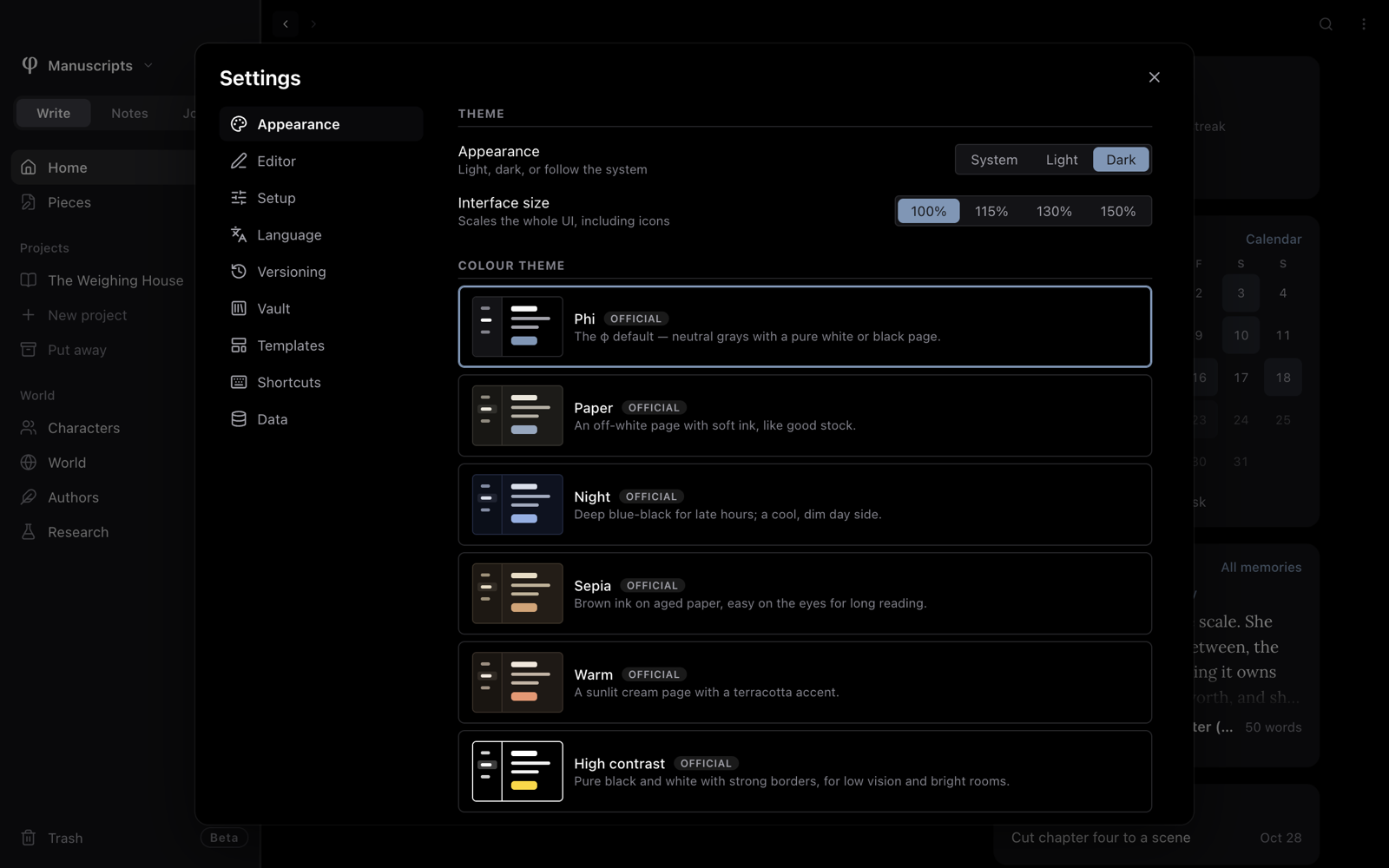
Open Settings
There are three ways:
- Click the sliders button at the top of the sidebar, beside the vault's name.
- Press
⌘Pand choose Open settings. - On a Mac, press
⌘,, or choose Preferences… in the app menu.
Some settings change the whole app. Others change only the open vault. A vault is the folder that holds your work.
| Section | What it holds | Applies to |
|---|---|---|
| Appearance | Light or dark, interface size, colour theme, the sidebar's colour, moments | The whole app |
| Editor | The area you write in: font, size, focus, dates, streak, code, versions | The whole app |
| Setup | The signals (what Poiesis shows you about your writing) and the places each mode has | The open vault |
| Language | The app's language, spelling, your dictionary | The whole app, plus a This vault part |
| Versioning | How history is kept and backed up | The open vault |
| Vault | Which modes the vault has, and adding or removing vaults | The open vault |
| Templates | Your templates and their variables | This vault and every vault |
| Shortcuts | Quick capture, your own keys, and the main keyboard shortcuts | The whole app |
| Data | The state of your files, a backup of the vault, migration backups, a reset | The whole app |
Appearance
How Poiesis looks. Themes & languages has more about colour themes.
| Setting | What it does |
|---|---|
| Appearance | System, Light or Dark. System follows your computer: Poiesis turns dark when your computer does. |
| Interface size | 100%, 115%, 130% or 150%. Makes everything larger, icons too. |
| Colour theme | φ's own theme and the five that come with Poiesis (Paper, Night, Sepia, Warm and High contrast), plus any you installed, each with a small preview. Use Install theme… and Browse official themes… to add more. Open themes folder shows where themes are kept. |
| Sidebar in light theme | Dark or Light. Dark is the default, so the page is the brightest part of the screen. In the dark theme the sidebar is always dark. |
| Sanctuary dims the rest | Sanctuary hides everything in Poiesis except the page. With this setting on, Sanctuary dims everything except the sentence you are writing. If Focus typing is set to Paragraph, the whole paragraph stays clear. Turn the setting off to dim nothing. |
Under Moments (see Memories & celebrations):
| Setting | What it does |
|---|---|
| Celebrations | A little confetti when you reach a milestone: a streak, a book's word goal, a lifetime word count. Never while you type. |
| A memory when φ opens | Once a day, a small card in the corner offers what you wrote on this day in an earlier year. |
Editor
The area you write in.
| Setting | What it does |
|---|---|
| Body font | The typeface you write in. The list is grouped into Serif, Sans and Mono. Fonts marked system come from your computer. The others come with Poiesis, and Poiesis puts them inside the ebooks you make. |
| Font size | 14 to 26 px. Reset returns to the default. |
| Line height | The space between lines, 1.3 to 2.2. Reset returns to the default. |
| Focus typing | Off, Sentence or Paragraph. Dims everything except the sentence or paragraph you are writing. |
| Show Markdown | Shows the Markdown marks (**, # and [ ]( )) in pale text around the formatting, in the line you are writing. Your documents don't change. |
| Typewriter scrolling | Keeps the line you're writing in the middle of the window. |
| Date format | How dates are shown in the whole app: June 11, 2026, Jun 11, 2026, 6/11/2026, 2026-06-11, Tue, Jun 11, 2026, or Custom…. Only the way the date is shown changes. The stored day never changes. |
| Custom pattern | Appears when you choose Custom…. Type a pattern with date-fns tokens (yyyy, MMM, d, EEEE…). Poiesis shows today's date in that pattern as you type. |
| Minimum words / day | Under Writing streak. The number of words you must write for a day to count in your streak (50 or more). A streak is a run of days in a row on which you wrote. |
| Indent using | Under Code. Spaces or Tabs in code blocks. |
| Indent width | Under Code. The number of spaces in one indent, 1 to 8. It also sets how wide a tab looks. |
| Version diff detail | Under Versions & import. When you preview an old version, Poiesis marks changes by Word or by Character. |
| Imported images | Under Versions & import. Copy to vault puts images you import in the vault's assets/ folder. Inline keeps them inside the document, which makes the document larger. |
Setup
What Poiesis shows you in this vault. When you turn something off, Poiesis hides it. Your work is never hidden or removed. Setup explains all of this.
| Setting | What it does |
|---|---|
| Start sessions automatically | On: the session clock starts when you type the first letter. Off: it runs only when you start it. |
| Readability statistics | Shows reading grade and sentence length in a document's statistics. |
| Streak | Flame and count, Plain days or Off. |
| Week starts on | Any day of the week. It sets the first column of the calendar and the heatmap, and the week that your pace is counted in. |
| Weekly pace | None, or the number of days a week you want to write. A missed day never resets it. |
| Modes | Open Write, Notes or Journal to set up that mode. You can choose the places it has (Characters, Authors, Research, Boards, Graph, Calendar, morning pages). You can change the signals (the settings above) for that mode only. You can turn Checklists on or off. Each mode reads Follows the vault or Differs. Follow the vault again removes the difference. |
| Saved setups | Appears once you have more than one vault, or a setup is saved. Save as… saves this setup under a name. Use in this vault or Use in another vault… applies a saved setup to a vault. You can also rename or delete a saved setup. |
Language
| Setting | What it does |
|---|---|
| Interface language | The language of Poiesis's menus and labels: System default, a language that comes with Poiesis, or one you installed. Install a language…, Export English template… and Open folder are below it. |
| Check spelling | Underlines misspelled words as you write. |
| Engine | Native uses your computer's spell-checker. Enhanced uses Poiesis's own dictionaries, so the results are the same on every computer. |
| Languages | The languages to check. With Native on a Mac, the Mac picks the language itself. |
| Default for this vault | Under This vault. Use global, Native or Enhanced, for this vault only. With Enhanced, you can also choose this vault's languages. |
| Personal dictionary | The words you added. Each has a trash button to remove it. |
| Dictionary & Thesaurus | Install dictionary pack… adds a dictionary. Below it are the packs you have, with their word counts. |
See Themes & languages, Spelling and Dictionary & thesaurus.
Versioning
These settings are for the open vault. Its name is shown at the top. Each vault keeps its own history.
| Setting | What it does |
|---|---|
| Backend | Native: versions kept on this computer, with nothing to install. Git: history with no limit, and a backup to another place if you want one. Until git is installed, the choice reads Git (needs git). When you switch to git, Poiesis asks first and moves your history across. To go back, you must remove the vault's .git folder yourself. |
| Auto-checkpoint every | How often Poiesis makes a version of your edits without being asked. Type a number of minutes, or pick 1, 5, 10, 30 or Off. This doesn't change the versions you save yourself. |
| Local history limit | Native only. The largest number of versions kept for each document. Older versions are removed. |
When the backend is Git, a Git backup group appears:
| Setting | What it does |
|---|---|
| Commit name · Commit email | The name and email recorded in the history. If they are blank, Poiesis uses your computer's git user. |
| SSH key path | The private key Poiesis uses to send the backup. Browse… lets you pick the file. The key file must be chmod 600. |
| Backup remote URL | The address the backup is sent to. If it is blank, Poiesis uses the repository's existing remote. |
| Auto-push backups | Sends new history on a schedule. Push every sets the number of minutes. |
| Sign commits | Signs commits so that they show as verified. Choose a Signing method (SSH or GPG) and a Signing key. |
| Backup now | Shows the state of the backup: up to date, commits waiting to be sent, or no remote yet. Push now sends the backup at once. |
If the vault is in a cloud folder, Poiesis keeps its git repository on this
computer, not inside the vault. Poiesis on iPhone and iPad (coming soon) never runs
git. It keeps versions in the vault's .poiesis-history.
Versions & backup has more.
Vault
| Setting | What it does |
|---|---|
| Active vault | The open vault's name and folder. |
| Spaces | The modes the vault shows: Write, Notes and Journal (at least one). Opens on sets what you see when the vault opens: Home or one of its modes. |
| Manage | Open vault… and Create vault… add a vault. Remove vault… asks how to remove it. Unlink (keep folder) removes the vault from Poiesis and doesn't touch the folder. Move to Trash moves the whole folder to your computer's Trash; you can still get it back from there. |
See Vaults.
Templates
At the top are the variables a template can use: <% today %>,
<% tomorrow %>, <% yesterday %>, <% time %> and <% cursor %>. The
last one marks where the cursor goes in the new document.
Below them are two lists: This vault and Global templates. Each template has a pencil button to edit it and a trash button to remove it.
- Install a template… adds a template file.
- Open templates folder shows where templates are kept.
See Templates.
Shortcuts
| Setting | What it does |
|---|---|
| Quick capture | The shortcut that opens the quick capture window from anywhere, even with Poiesis in the background (⌥⇧⌘N to start with). Click the key and press the one you want, or choose Off. If another app already uses that shortcut, Poiesis says so. See Notes & capture. |
| Your keys | Puts app commands (find, the command palette, new and close, back and forward, reading mode, Sanctuary, typewriter scrolling, the panels, Print and more) on keys you choose. Click a command's key and press the new one. Esc cancels, and Delete leaves the command without a key. If another command had that key, it moves over and Poiesis says which command lost it. The button at the end of a row puts back φ's own key for that command; Back to φ's keys puts back all of them. |
Below them are the main keyboard shortcuts, in five groups: Move around,
Go to, Documents, Writing and Format. This is the same list that ⌘/
shows. Type in Search commands… to find a shortcut.
The menus, ⌘/ and this list all show your own keys. Formatting keys, such
as ⌘B and ⌘I, can't be changed.
Keyboard shortcuts lists every shortcut.
Data
| Setting | What it does |
|---|---|
| Vault backup | Back up vault… saves one dated ZIP of the open vault: every document, folder, record, attachment and the vault's settings. Version history and the trash stay out. See Versions & backup. |
| Vault health | Shows whether your documents use the current file format. If some use an older format, Migrate all notes updates them. Poiesis saves a backup of each one first. |
| Backups | Appears after documents have been migrated. It shows how many backups there are and their size. Open backups folder shows them; Clear old backups removes old ones. |
| Reset all settings… | Returns every app setting (theme, editor, layout, graph, dates) to its default. Poiesis asks first. Your documents, vaults and writing records are kept. |
See also
- Setup: all about signals, places and modes.
- Themes & languages
- Keyboard shortcuts
- Versions & backup
- Memories & celebrations